
EME
A long-standing unreachable love comes closer
Operation plan for the coming days
- 144.122 MHz – default frequency
- Q65
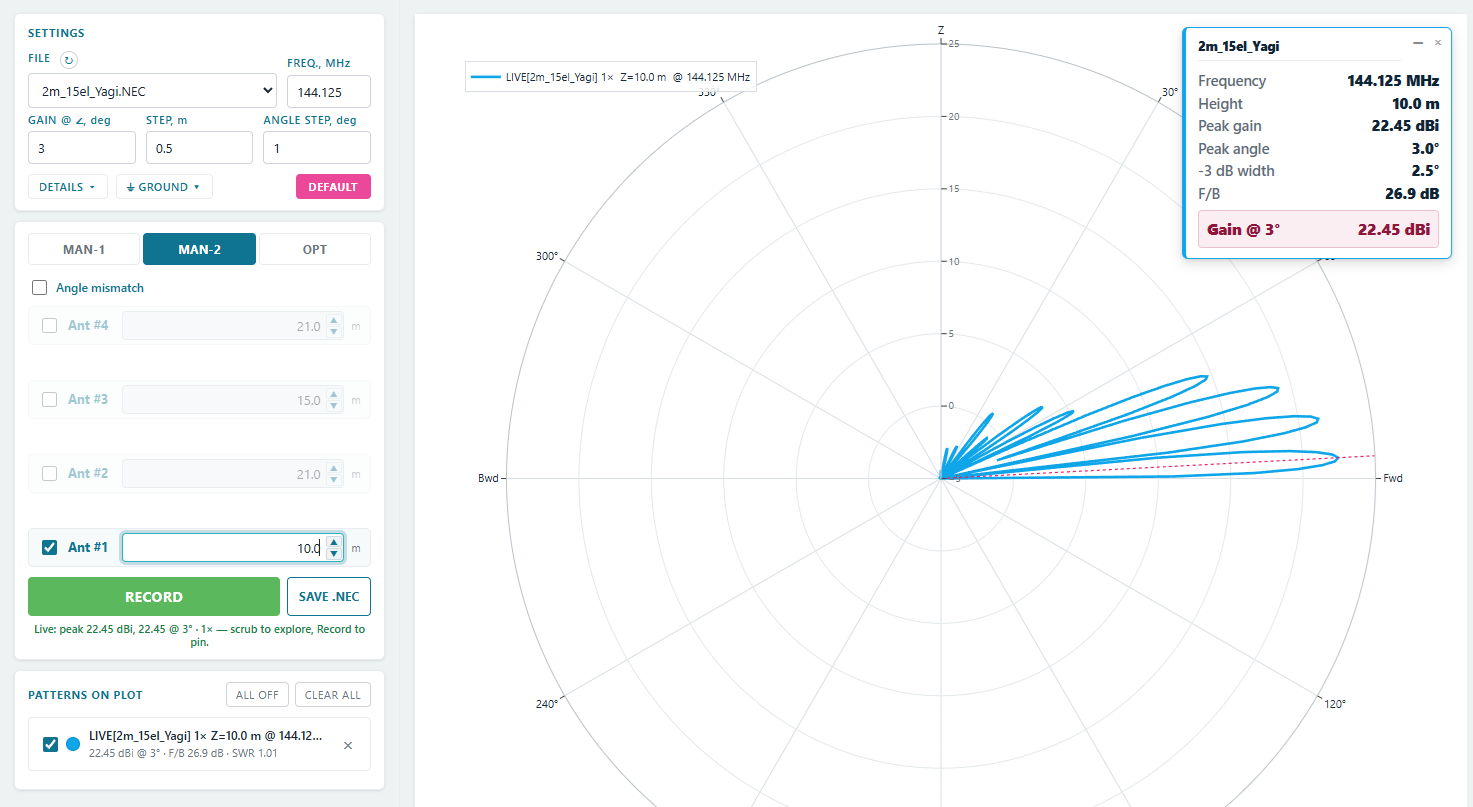
- 1×15-ele horiz. OWA Yagi, 10 meters above the ground + 23 meter of LMR400 cable (Chinese)
- No LNA
- No elevation rotation (yet)
- 100W – Icom 9700
- MN83po grid
| Date | Peak 3GMT −3.4 dB · 15.0° el |
Peak 2GMT −1.1 dB · 9.0° el |
Main peakGMT 22.45 dBi · 3.0° el |
|---|---|---|---|
| 16 Aug Sun | 13:37–13:56↑241° | 14:15–14:33↑248° | 14:51–15:09↑254° |
| 17 Aug Mon | 13:49–14:12↑231° | 14:32–14:52↑239° | 15:11–15:29↑246° |
| 18 Aug Tue | 14:01–14:27↑222° | 14:50–15:12↑231° | 15:32–15:52↑238° |
| 19 Aug Wed | 14:12–14:43↑213° | 15:10–15:35↑224° | 15:57–16:19↑232° |
| 20 Aug Thu | 14:24–15:04↑205° | 15:36–16:04↑218° | 16:29–16:52↑228° |
| 21 Aug Fri | 14:41–15:35↑199° | 16:11–16:41↑215° | 17:08–17:32↑225° |
| 22 Aug Sat | 15:20–16:21↑197° | 16:59–17:30↑214° | 17:57–18:22↑224° |
| 23 Aug Sun | 16:35–17:25↑201° | 18:00–18:30↑216° | 18:56–19:20↑226° |
| 24 Aug Mon | 18:04–18:41↑209° | 19:11–19:38↑221° | 20:02–20:25↑230° |
| 25 Aug Tue | 19:31–20:00↑218° | 20:26–20:50↑228° | 21:12–21:33↑236° |
| 26 Aug Wed | 20:54–21:19↑227° | 21:41–22:02↑236° | 22:22–22:42↑243° |
| 27 Aug Thu | 22:13–22:34↑237° | 22:54–23:14↑245° | 23:32–23:51↑252° |
| 28 Aug Fri | 23:28–23:47↑247° | 00:06–00:24+1↑254° | 00:42–01:00+1↑260° |
| 30 Aug Sun | 00:40–00:59↑257° | 01:16–01:34↑263° | 01:52–02:09↑269° |
| 31 Aug Mon | 01:51–02:09↑266° | 02:27–02:45↑272° | 03:02–03:20↑278° |
| 1 Sep Tue | 03:03–03:21↑275° | 03:38–03:56↑281° | 04:14–04:33↑287° |
| 2 Sep Wed | 04:15–04:33↑283° | 04:51–05:10↑288° | 05:29–05:48↑295° |
| 3 Sep Thu | 05:27–05:46↑289° | 06:05–06:24↑294° | 06:44–07:04↑301° |
| 4 Sep Fri | 06:38–06:57↑293° | 07:17–07:36↑298° | 07:57–08:18↑305° |
| 5 Sep Sat | 07:44–08:03↑294° | 08:23–08:43↑300° | 09:04–09:25↑306° |
| 6 Sep Sun | 08:42–09:01↑292° | 09:20–09:40↑298° | 10:00–10:21↑304° |
| 7 Sep Mon | 09:31–09:49↑288° | 10:08–10:27↑293° | 10:46–11:05↑299° |
| 8 Sep Tue | 10:10–10:28↑282° | 10:46–11:04↑287° | 11:22–11:40↑293° |
| 9 Sep Wed | 10:41–10:59↑274° | 11:16–11:33↑279° | 11:50–12:08↑285° |
| 10 Sep Thu | 11:06–11:23↑265° | 11:40–11:57↑270° | 12:14–12:31↑276° |
| 11 Sep Fri | 11:26–11:44↑255° | 12:01–12:18↑261° | 12:35–12:52↑267° |
| 12 Sep Sat | 11:42–12:01↑246° | 12:19–12:37↑252° | 12:55–13:12↑258° |
| 13 Sep Sun | 11:56–12:17↑236° | 12:36–12:55↑243° | 13:14–13:32↑250° |
| 14 Sep Mon | 12:08–12:32↑226° | 12:54–13:15↑235° | 13:35–13:54↑242° |
| 15 Sep Tue | 12:20–12:48↑217° | 13:13–13:37↑227° | 13:58–14:19↑235° |
| 16 Sep Wed | 12:31–13:08↑208° | 13:37–14:03↑221° | 14:27–14:50↑229° |
| 17 Sep Thu | 12:46–13:34↑201° | 14:08–14:37↑216° | 15:03–15:27↑226° |
| 18 Sep Fri | 13:13–14:13↑197° | 14:51–15:22↑214° | 15:49–16:13↑224° |
| 19 Sep Sat | 14:15–15:10↑199° | 15:47–16:17↑215° | 16:44–17:08↑225° |
| 20 Sep Sun | 15:40–16:22↑206° | 16:54–17:22↑219° | 17:47–18:10↑228° |
| 21 Sep Mon | 17:07–17:40↑214° | 18:07–18:32↑225° | 18:55–19:16↑234° |
| 22 Sep Tue | 18:32–18:58↑223° | 19:22–19:44↑233° | 20:05–20:25↑240° |
| 23 Sep Wed | 19:52–20:15↑233° | 20:36–20:56↑241° | 21:15–21:34↑248° |
| 24 Sep Thu | 21:09–21:29↑243° | 21:48–22:07↑250° | 22:25–22:43↑257° |
| 25 Sep Fri | 22:23–22:42↑253° | 23:00–23:18↑260° | 23:36–23:53↑266° |
| 26 Sep Sat | 23:36–23:54↑263° | 00:12–00:29+1↑269° | 00:47–01:04+1↑275° |
| 28 Sep Mon | 00:49–01:07↑272° | 01:24–01:42↑278° | 02:00–02:18↑284° |
| 29 Sep Tue | 02:02–02:21↑280° | 02:39–02:57↑286° | 03:15–03:34↑292° |
| 30 Sep Wed | 03:16–03:35↑287° | 03:54–04:13↑293° | 04:32–04:52↑299° |
| 1 Oct Thu | 04:29–04:48↑291° | 05:07–05:27↑297° | 05:47–06:08↑304° |
| 2 Oct Fri | 05:37–05:57↑293° | 06:16–06:36↑299° | 06:57–07:18↑306° |
| 3 Oct Sat | 06:38–06:57↑293° | 07:16–07:36↑298° | 07:56–08:17↑305° |
| 4 Oct Sun | 07:29–07:47↑289° | 08:06–08:25↑295° | 08:44–09:04↑301° |
| 5 Oct Mon | 08:10–08:28↑284° | 08:46–09:04↑289° | 09:22–09:41↑295° |
| 6 Oct Tue | 08:43–09:00↑277° | 09:18–09:35↑282° | 09:53–10:10↑288° |
| 7 Oct Wed | 09:09–09:26↑268° | 09:43–10:01↑274° | 10:18–10:35↑279° |
| 8 Oct Thu | 09:30–09:48↑259° | 10:05–10:22↑265° | 10:39–10:56↑271° |
| 9 Oct Fri | 09:48–10:06↑250° | 10:24–10:41↑256° | 10:59–11:16↑262° |
| 10 Oct Sat | 10:03–10:23↑240° | 10:41–11:00↑247° | 11:18–11:35↑253° |
| 11 Oct Sun | 10:16–10:38↑230° | 10:59–11:19↑238° | 11:38–11:57↑245° |
| 12 Oct Mon | 10:28–10:54↑221° | 11:17–11:40↑230° | 12:00–12:20↑238° |
| 13 Oct Tue | 10:40–11:12↑212° | 11:39–12:04↑223° | 12:27–12:49↑232° |
| 14 Oct Wed | 10:54–11:35↑205° | 12:08–12:35↑218° | 13:00–13:24↑227° |
| 15 Oct Thu | 11:15–12:09↑199° | 12:45–13:16↑215° | 13:42–14:07↑225° |
| 16 Oct Fri | 12:03–12:59↑198° | 13:36–14:07↑215° | 14:34–14:58↑225° |
| 17 Oct Sat | 13:20–14:05↑203° | 14:39–15:08↑218° | 15:33–15:57↑227° |
| 18 Oct Sun | 14:45–15:20↑211° | 15:49–16:15↑223° | 16:39–17:01↑232° |
| 19 Oct Mon | 16:09–16:38↑220° | 17:02–17:25↑230° | 17:47–18:08↑238° |
| 20 Oct Tue | 17:30–17:54↑229° | 18:15–18:36↑238° | 18:56–19:15↑245° |
| 21 Oct Wed | 18:47–19:08↑239° | 19:27–19:47↑246° | 20:05–20:23↑253° |
| 22 Oct Thu | 20:01–20:20↑248° | 20:39–20:57↑255° | 21:15–21:32↑262° |
| 23 Oct Fri | 21:14–21:32↑258° | 21:50–22:08↑265° | 22:25–22:43↑271° |
| 24 Oct Sat | 22:27–22:45↑268° | 23:03–23:20↑274° | 23:38–23:56↑280° |
| 25 Oct Sun | 23:41–23:59↑277° | 00:17–00:35+1↑282° | 00:54–01:12+1↑288° |
| 27 Oct Tue | 00:57–01:16↑284° | 01:34–01:53↑290° | 02:12–02:31↑296° |
| 28 Oct Wed | 02:13–02:32↑290° | 02:51–03:10↑296° | 03:30–03:51↑302° |
| 29 Oct Thu | 03:25–03:45↑293° | 04:04–04:24↑299° | 04:45–05:06↑305° |
| 30 Oct Fri | 04:30–04:50↑293° | 05:09–05:29↑299° | 05:49–06:10↑305° |
| 31 Oct Sat | 05:26–05:44↑290° | 06:03–06:22↑296° | 06:42–07:02↑302° |
| 1 Nov Sun | 06:10–06:28↑285° | 06:46–07:05↑291° | 07:23–07:43↑297° |
| 2 Nov Mon | 06:46–07:03↑279° | 07:21–07:38↑284° | 07:56–08:14↑290° |
| 3 Nov Tue | 07:13–07:31↑271° | 07:48–08:05↑276° | 08:22–08:39↑282° |
| 4 Nov Wed | 07:36–07:53↑262° | 08:10–08:27↑268° | 08:44–09:01↑273° |
| 5 Nov Thu | 07:54–08:12↑253° | 08:30–08:47↑259° | 09:04–09:21↑265° |
| 6 Nov Fri | 08:10–08:29↑243° | 08:47–09:05↑250° | 09:23–09:40↑256° |
| 7 Nov Sat | 08:23–08:45↑234° | 09:05–09:24↑241° | 09:42–10:01↑248° |
| 8 Nov Sun | 08:36–09:00↑225° | 09:23–09:44↑233° | 10:04–10:23↑240° |
| 9 Nov Mon | 08:48–09:18↑216° | 09:43–10:07↑226° | 10:29–10:50↑234° |
| 10 Nov Tue | 09:02–09:39↑208° | 10:09–10:35↑220° | 11:00–11:22↑229° |
| 11 Nov Wed | 09:21–10:09↑201° | 10:43–11:12↑216° | 11:38–12:02↑226° |
| 12 Nov Thu | 09:58–10:53↑199° | 11:29–12:00↑215° | 12:26–12:51↑225° |
| 13 Nov Fri | 11:05–11:53↑202° | 12:28–12:57↑217° | 13:23–13:47↑226° |
| 14 Nov Sat | 12:27–13:05↑208° | 13:35–14:02↑221° | 14:26–14:49↑230° |
| 15 Nov Sun | 13:51–14:21↑217° | 14:47–15:11↑227° | 15:33–15:54↑235° |
| 16 Nov Mon | 15:11–15:36↑226° | 15:59–16:20↑235° | 16:41–17:00↑242° |
| 17 Nov Tue | 16:27–16:49↑235° | 17:09–17:29↑243° | 17:48–18:07↑250° |
| 18 Nov Wed | 17:40–18:00↑244° | 18:19–18:37↑251° | 18:55–19:13↑258° |
| 19 Nov Thu | 18:51–19:10↑254° | 19:28–19:46↑260° | 20:03–20:21↑266° |
| 20 Nov Fri | 20:03–20:21↑263° | 20:38–20:56↑269° | 21:13–21:31↑275° |
| 21 Nov Sat | 21:15–21:33↑272° | 21:51–22:08↑278° | 22:26–22:44↑284° |
| 22 Nov Sun | 22:30–22:48↑280° | 23:06–23:25↑286° | 23:43–00:02↑292° |
| 23 Nov Mon | 23:46–00:05↑287° | 00:24–00:43+1↑293° | 01:03–01:23+1↑299° |
| 25 Nov Wed | 01:02–01:22↑292° | 01:41–02:01↑297° | 02:21–02:42↑304° |
| 26 Nov Thu | 02:13–02:33↑293° | 02:52–03:12↑299° | 03:33–03:54↑305° |
| 27 Nov Fri | 03:15–03:34↑291° | 03:53–04:13↑297° | 04:33–04:53↑303° |
| 28 Nov Sat | 04:06–04:24↑287° | 04:42–05:01↑293° | 05:20–05:40↑299° |
| 29 Nov Sun | 04:45–05:03↑281° | 05:21–05:39↑286° | 05:57–06:15↑292° |
| 30 Nov Mon | 05:16–05:34↑273° | 05:51–06:08↑278° | 06:25–06:43↑284° |
| 1 Dec Tue | 05:41–05:58↑264° | 06:15–06:32↑270° | 06:49–07:06↑276° |
| 2 Dec Wed | 06:00–06:18↑255° | 06:35–06:53↑261° | 07:10–07:26↑267° |
| 3 Dec Thu | 06:17–06:35↑246° | 06:54–07:11↑252° | 07:29–07:46↑258° |
| 4 Dec Fri | 06:31–06:51↑237° | 07:11–07:30↑244° | 07:48–08:06↑250° |
| 5 Dec Sat | 06:43–07:07↑227° | 07:28–07:49↑236° | 08:09–08:28↑243° |
| 6 Dec Sun | 06:56–07:23↑219° | 07:48–08:11↑228° | 08:32–08:53↑236° |
| 7 Dec Mon | 07:09–07:43↑210° | 08:12–08:37↑222° | 09:01–09:23↑230° |
| 8 Dec Tue | 07:26–08:10↑203° | 08:43–09:11↑217° | 09:36–10:00↑227° |
| 9 Dec Wed | 07:56–08:49↑199° | 09:25–09:55↑215° | 10:21–10:46↑225° |
| 10 Dec Thu | 08:53–09:44↑201° | 10:19–10:49↑216° | 11:16–11:40↑226° |
| 11 Dec Fri | 10:13–10:53↑206° | 11:25–11:52↑220° | 12:17–12:40↑229° |
| 12 Dec Sat | 11:36–12:08↑214° | 12:35–13:00↑225° | 13:23–13:44↑234° |
| 13 Dec Sun | 12:57–13:23↑223° | 13:47–14:09↑232° | 14:30–14:50↑240° |
| 14 Dec Mon | 14:13–14:36↑232° | 14:57–15:17↑240° | 15:36–15:55↑247° |
| 15 Dec Tue | 15:25–15:46↑241° | 16:05–16:24↑248° | 16:42–17:00↑255° |
| 16 Dec Wed | 16:35–16:54↑250° | 17:12–17:30↑257° | 17:48–18:05↑263° |
| 17 Dec Thu | 17:44–18:02↑260° | 18:20–18:37↑266° | 18:55–19:12↑272° |
| 18 Dec Fri | 18:53–19:11↑268° | 19:28–19:46↑274° | 20:04–20:21↑280° |
| 19 Dec Sat | 20:04–20:22↑277° | 20:40–20:58↑283° | 21:16–21:35↑289° |
| 20 Dec Sun | 21:18–21:36↑284° | 21:55–22:13↑290° | 22:32–22:52↑296° |
| 21 Dec Mon | 22:33–22:52↑290° | 23:11–23:31↑295° | 23:51–00:11↑302° |
| 22 Dec Tue | 23:47–00:06↑293° | 00:26–00:46+1↑298° | 01:06–01:28+1↑305° |
| 24 Dec Thu | 00:55–01:14↑293° | 01:33–01:53↑298° | 02:14–02:35↑305° |
| 25 Dec Fri | 01:53–02:11↑289° | 02:30–02:49↑295° | 03:09–03:29↑301° |
| 26 Dec Sat | 02:39–02:57↑284° | 03:15–03:33↑289° | 03:51–04:10↑295° |
| 27 Dec Sun | 03:15–03:32↑276° | 03:49–04:07↑282° | 04:24–04:42↑287° |
| 28 Dec Mon | 03:43–04:00↑268° | 04:17–04:34↑273° | 04:51–05:08↑279° |
| 29 Dec Tue | 04:05–04:22↑258° | 04:39–04:56↑264° | 05:13–05:30↑270° |
| 30 Dec Wed | 04:22–04:41↑249° | 04:59–05:16↑255° | 05:34–05:51↑261° |
| 31 Dec Thu | 04:37–04:57↑239° | 05:16–05:35↑246° | 05:53–06:11↑252° |
| Date | Main peakGMT 22.45 dBi · 3.0° el |
Peak 2GMT −1.1 dB · 9.0° el |
Peak 3GMT −3.4 dB · 15.0° el |
|---|---|---|---|
| 16 Aug Sun | 04:14–04:32↑102° | 04:50–05:08↑109° | 05:27–05:47↑116° |
| 17 Aug Mon | 05:24–05:42↑111° | 06:02–06:22↑118° | 06:42–07:04↑126° |
| 18 Aug Tue | 06:33–06:53↑119° | 07:14–07:36↑126° | 07:59–08:25↑136° |
| 19 Aug Wed | 07:42–08:03↑126° | 08:26–08:50↑134° | 09:17–09:49↑145° |
| 20 Aug Thu | 08:48–09:11↑131° | 09:36–10:04↑140° | 10:36–11:16↑154° |
| 21 Aug Fri | 09:51–10:15↑135° | 10:42–11:12↑145° | 11:48–12:42↑161° |
| 22 Aug Sat | 10:47–11:11↑136° | 11:39–12:10↑146° | 12:47–13:49↑163° |
| 23 Aug Sun | 11:34–11:58↑135° | 12:24–12:54↑144° | 13:29–14:18↑160° |
| 24 Aug Mon | 12:12–12:35↑131° | 12:59–13:26↑140° | 13:56–14:33↑153° |
| 25 Aug Tue | 12:43–13:04↑126° | 13:26–13:50↑134° | 14:15–14:45↑144° |
| 26 Aug Wed | 13:08–13:28↑119° | 13:48–14:09↑126° | 14:31–14:56↑135° |
| 27 Aug Thu | 13:30–13:48↑112° | 14:07–14:26↑118° | 14:46–15:07↑126° |
| 28 Aug Fri | 13:50–14:07↑103° | 14:25–14:43↑109° | 15:01–15:20↑116° |
| 29 Aug Sat | 14:09–14:26↑95° | 14:43–15:00↑101° | 15:18–15:36↑107° |
| 30 Aug Sun | 14:29–14:45↑86° | 15:02–15:19↑92° | 15:36–15:54↑97° |
| 31 Aug Mon | 14:50–15:07↑78° | 15:25–15:42↑83° | 15:59–16:16↑89° |
| 1 Sep Tue | 15:15–15:33↑70° | 15:51–16:09↑75° | 16:26–16:44↑81° |
| 2 Sep Wed | 15:46–16:05↑63° | 16:24–16:43↑69° | 17:01–17:19↑74° |
| 3 Sep Thu | 16:26–16:46↑57° | 17:06–17:25↑64° | 17:44–18:03↑69° |
| 4 Sep Fri | 17:16–17:38↑55° | 17:58–18:18↑61° | 18:38–18:57↑67° |
| 5 Sep Sat | 18:19–18:41↑54° | 19:01–19:22↑61° | 19:41–20:00↑67° |
| 6 Sep Sun | 19:32–19:53↑58° | 20:13–20:33↑64° | 20:52–21:11↑70° |
| 7 Sep Mon | 20:51–21:10↑63° | 21:29–21:48↑69° | 22:07–22:25↑75° |
| 8 Sep Tue | 22:09–22:28↑71° | 22:46–23:04↑77° | 23:22–23:40↑83° |
| 9 Sep Wed | 23:26–23:44↑79° | 00:02–00:19+1↑85° | 00:37–00:55+1↑91° |
| 11 Sep Fri | 00:40–00:58↑89° | 01:15–01:33↑95° | 01:51–02:09↑101° |
| 12 Sep Sat | 01:52–02:10↑98° | 02:28–02:46↑104° | 03:04–03:24↑111° |
| 13 Sep Sun | 03:03–03:22↑107° | 03:40–04:00↑114° | 04:19–04:40↑121° |
| 14 Sep Mon | 04:14–04:33↑115° | 04:53–05:14↑123° | 05:36–06:00↑131° |
| 15 Sep Tue | 05:24–05:45↑123° | 06:07–06:30↑131° | 06:55–07:24↑141° |
| 16 Sep Wed | 06:33–06:55↑129° | 07:19–07:45↑138° | 08:15–08:51↑150° |
| 17 Sep Thu | 07:38–08:02↑133° | 08:28–08:57↑143° | 09:31–10:19↑158° |
| 18 Sep Fri | 08:37–09:02↑136° | 09:29–10:00↑146° | 10:37–11:37↑163° |
| 19 Sep Sat | 09:28–09:52↑135° | 10:19–10:49↑145° | 11:25–12:20↑161° |
| 20 Sep Sun | 10:09–10:32↑133° | 10:58–11:25↑142° | 11:57–12:39↑155° |
| 21 Sep Mon | 10:43–11:04↑128° | 11:27–11:52↑137° | 12:19–12:52↑148° |
| 22 Sep Tue | 11:10–11:30↑122° | 11:51–12:13↑130° | 12:37–13:03↑139° |
| 23 Sep Wed | 11:33–11:52↑115° | 12:11–12:31↑122° | 12:52–13:14↑130° |
| 24 Sep Thu | 11:54–12:12↑107° | 12:30–12:48↑113° | 13:07–13:27↑120° |
| 25 Sep Fri | 12:13–12:30↑98° | 12:48–13:05↑104° | 13:23–13:41↑111° |
| 26 Sep Sat | 12:33–12:50↑90° | 13:07–13:24↑95° | 13:41–13:59↑101° |
| 27 Sep Sun | 12:54–13:11↑81° | 13:28–13:45↑86° | 14:02–14:20↑92° |
| 28 Sep Mon | 13:19–13:36↑72° | 13:54–14:11↑78° | 14:29–14:46↑83° |
| 29 Sep Tue | 13:48–14:07↑65° | 14:25–14:44↑71° | 15:01–15:19↑76° |
| 30 Sep Wed | 14:26–14:46↑59° | 15:05–15:24↑65° | 15:43–16:01↑71° |
| 1 Oct Thu | 15:13–15:34↑55° | 15:55–16:14↑62° | 16:34–16:53↑67° |
| 2 Oct Fri | 16:13–16:34↑54° | 16:55–17:15↑61° | 17:34–17:54↑67° |
| 3 Oct Sat | 17:22–17:43↑56° | 18:04–18:23↑63° | 18:43–19:02↑69° |
| 4 Oct Sun | 18:38–18:58↑61° | 19:17–19:36↑67° | 19:55–20:14↑73° |
| 5 Oct Mon | 19:55–20:14↑68° | 20:32–20:51↑74° | 21:09–21:27↑80° |
| 6 Oct Tue | 21:10–21:28↑76° | 21:46–22:04↑82° | 22:21–22:39↑88° |
| 7 Oct Wed | 22:23–22:41↑85° | 22:58–23:16↑91° | 23:34–23:52↑97° |
| 8 Oct Thu | 23:35–23:52↑94° | 00:10–00:28+1↑100° | 00:46–01:04+1↑107° |
| 10 Oct Sat | 00:45–01:03↑103° | 01:21–01:40↑110° | 01:59–02:19↑117° |
| 11 Oct Sun | 01:55–02:14↑112° | 02:33–02:54↑119° | 03:14–03:37↑127° |
| 12 Oct Mon | 03:06–03:26↑120° | 03:47–04:09↑127° | 04:32–04:59↑137° |
| 13 Oct Tue | 04:15–04:37↑126° | 05:00–05:25↑135° | 05:52–06:25↑146° |
| 14 Oct Wed | 05:23–05:46↑132° | 06:11–06:39↑141° | 07:11–07:53↑154° |
| 15 Oct Thu | 06:25–06:49↑135° | 07:16–07:46↑145° | 08:22–09:16↑161° |
| 16 Oct Fri | 07:19–07:44↑135° | 08:10–08:41↑145° | 09:18–10:14↑162° |
| 17 Oct Sat | 08:04–08:28↑134° | 08:54–09:22↑143° | 09:56–10:42↑158° |
| 18 Oct Sun | 08:41–09:03↑130° | 09:27–09:52↑139° | 10:21–10:57↑151° |
| 19 Oct Mon | 09:10–09:31↑125° | 09:52–10:15↑132° | 10:40–11:08↑142° |
| 20 Oct Tue | 09:35–09:54↑118° | 10:14–10:34↑125° | 10:56–11:20↑133° |
| 21 Oct Wed | 09:56–10:14↑111° | 10:33–10:52↑117° | 11:11–11:32↑124° |
| 22 Oct Thu | 10:16–10:33↑102° | 10:51–11:08↑108° | 11:27–11:46↑115° |
| 23 Oct Fri | 10:35–10:52↑94° | 11:09–11:26↑99° | 11:44–12:02↑105° |
| 24 Oct Sat | 10:56–11:13↑85° | 11:30–11:47↑90° | 12:04–12:21↑96° |
| 25 Oct Sun | 11:19–11:37↑76° | 11:54–12:11↑82° | 12:28–12:46↑87° |
| 26 Oct Mon | 11:47–12:05↑68° | 12:23–12:41↑74° | 12:59–13:17↑79° |
| 27 Oct Tue | 12:22–12:42↑61° | 13:01–13:19↑67° | 13:38–13:56↑73° |
| 28 Oct Wed | 13:07–13:28↑57° | 13:48–14:08↑63° | 14:27–14:46↑68° |
| 29 Oct Thu | 14:05–14:26↑55° | 14:46–15:06↑61° | 15:26–15:45↑67° |
| 30 Oct Fri | 15:13–15:34↑56° | 15:54–16:14↑62° | 16:34–16:53↑68° |
| 31 Oct Sat | 16:28–16:49↑60° | 17:08–17:28↑66° | 17:46–18:05↑72° |
| 1 Nov Sun | 17:45–18:05↑66° | 18:23–18:42↑72° | 19:00–19:18↑78° |
| 2 Nov Mon | 19:01–19:19↑74° | 19:37–19:55↑80° | 20:13–20:31↑86° |
| 3 Nov Tue | 20:14–20:31↑82° | 20:49–21:06↑88° | 21:24–21:42↑94° |
| 4 Nov Wed | 21:24–21:42↑91° | 21:59–22:17↑97° | 22:35–22:53↑104° |
| 5 Nov Thu | 22:33–22:51↑100° | 23:09–23:27↑106° | 23:46–00:05↑113° |
| 6 Nov Fri | 23:42–00:00↑109° | 00:19–00:39+1↑115° | 00:59–01:20+1↑123° |
| 8 Nov Sun | 00:51–01:11↑117° | 01:31–01:52↑124° | 02:15–02:39↑133° |
| 9 Nov Mon | 02:01–02:22↑124° | 02:44–03:07↑132° | 03:33–04:03↑142° |
| 10 Nov Tue | 03:09–03:31↑130° | 03:55–04:22↑139° | 04:52–05:29↑151° |
| 11 Nov Wed | 04:13–04:37↑134° | 05:03–05:32↑143° | 06:06–06:54↑158° |
| 12 Nov Thu | 05:10–05:35↑135° | 06:01–06:32↑145° | 07:08–08:03↑161° |
| 13 Nov Fri | 05:59–06:23↑134° | 06:49–07:18↑144° | 07:53–08:41↑159° |
| 14 Nov Sat | 06:38–07:01↑131° | 07:25–07:52↑140° | 08:22–09:00↑153° |
| 15 Nov Sun | 07:10–07:31↑127° | 07:53–08:17↑135° | 08:43–09:13↑145° |
| 16 Nov Mon | 07:36–07:55↑121° | 08:16–08:37↑128° | 09:00–09:25↑137° |
| 17 Nov Tue | 07:58–08:16↑113° | 08:35–08:55↑120° | 09:15–09:37↑128° |
| 18 Nov Wed | 08:18–08:35↑106° | 08:53–09:11↑112° | 09:30–09:50↑119° |
| 19 Nov Thu | 08:37–08:54↑98° | 09:11–09:28↑103° | 09:46–10:04↑110° |
| 20 Nov Fri | 08:56–09:13↑89° | 09:30–09:47↑95° | 10:04–10:22↑100° |
| 21 Nov Sat | 09:18–09:35↑80° | 09:52–10:09↑86° | 10:26–10:44↑91° |
| 22 Nov Sun | 09:43–10:01↑72° | 10:19–10:36↑78° | 10:54–11:11↑83° |
| 23 Nov Mon | 10:15–10:34↑65° | 10:52–11:11↑70° | 11:28–11:47↑76° |
| 24 Nov Tue | 10:56–11:16↑59° | 11:35–11:55↑65° | 12:13–12:32↑70° |
| 25 Nov Wed | 11:49–12:10↑55° | 12:30–12:50↑62° | 13:09–13:29↑67° |
| 26 Nov Thu | 12:55–13:16↑55° | 13:37–13:57↑62° | 14:16–14:36↑67° |
| 27 Nov Fri | 14:11–14:32↑58° | 14:52–15:11↑65° | 15:30–15:49↑70° |
| 28 Nov Sat | 15:31–15:50↑64° | 16:10–16:28↑70° | 16:47–17:05↑76° |
| 29 Nov Sun | 16:50–17:08↑72° | 17:26–17:44↑78° | 18:02–18:20↑83° |
| 30 Nov Mon | 18:05–18:22↑80° | 18:40–18:58↑86° | 19:15–19:33↑92° |
| 1 Dec Tue | 19:16–19:34↑89° | 19:51–20:09↑95° | 20:27–20:45↑101° |
| 2 Dec Wed | 20:26–20:43↑98° | 21:01–21:19↑104° | 21:37–21:57↑111° |
| 3 Dec Thu | 21:34–21:52↑106° | 22:11–22:30↑113° | 22:49–23:10↑120° |
| 4 Dec Fri | 22:42–23:01↑115° | 23:21–23:42↑122° | 00:03–00:27+1↑130° |
| 5 Dec Sat | 23:51–00:11↑122° | 00:32–00:55+1↑130° | 01:20–01:48+1↑139° |
| 7 Dec Mon | 00:58–01:20↑128° | 01:44–02:09↑137° | 02:38–03:12↑148° |
| 8 Dec Tue | 02:03–02:27↑132° | 02:52–03:21↑142° | 03:54–04:37↑156° |
| 9 Dec Wed | 03:03–03:27↑135° | 03:54–04:24↑145° | 05:00–05:53↑160° |
| 10 Dec Thu | 03:54–04:18↑135° | 04:45–05:15↑144° | 05:50–06:41↑160° |
| 11 Dec Fri | 04:37–05:00↑132° | 05:25–05:52↑141° | 06:24–07:04↑155° |
| 12 Dec Sat | 05:11–05:32↑128° | 05:55–06:20↑136° | 06:47–07:19↑147° |
| 13 Dec Sun | 05:38–05:58↑122° | 06:19–06:41↑130° | 07:05–07:31↑139° |
| 14 Dec Mon | 06:01–06:20↑116° | 06:39–06:59↑123° | 07:20–07:43↑131° |
| 15 Dec Tue | 06:21–06:39↑108° | 06:57–07:16↑115° | 07:35–07:55↑122° |
| 16 Dec Wed | 06:40–06:57↑101° | 07:15–07:32↑106° | 07:50–08:09↑113° |
| 17 Dec Thu | 06:59–07:16↑92° | 07:32–07:50↑98° | 08:07–08:25↑104° |
| 18 Dec Fri | 07:18–07:35↑84° | 07:52–08:09↑90° | 08:26–08:44↑95° |
| 19 Dec Sat | 07:41–07:58↑76° | 08:16–08:33↑81° | 08:50–09:08↑87° |
| 20 Dec Sun | 08:08–08:27↑68° | 08:45–09:03↑74° | 09:20–09:38↑79° |
| 21 Dec Mon | 08:43–09:03↑62° | 09:22–09:41↑67° | 09:59–10:17↑73° |
| 22 Dec Tue | 09:29–09:50↑57° | 10:10–10:30↑63° | 10:49–11:08↑69° |
| 23 Dec Wed | 10:29–10:51↑55° | 11:11–11:31↑61° | 11:51–12:10↑67° |
| 24 Dec Thu | 11:42–12:03↑56° | 12:24–12:44↑63° | 13:03–13:22↑69° |
| 25 Dec Fri | 13:04–13:24↑61° | 13:43–14:03↑67° | 14:21–14:40↑73° |
| 26 Dec Sat | 14:27–14:45↑68° | 15:04–15:22↑74° | 15:40–15:59↑80° |
| 27 Dec Sun | 15:46–16:04↑77° | 16:22–16:40↑83° | 16:58–17:16↑89° |
| 28 Dec Mon | 17:02–17:20↑86° | 17:37–17:55↑92° | 18:13–18:31↑98° |
| 29 Dec Tue | 18:15–18:32↑95° | 18:50–19:08↑101° | 19:26–19:45↑108° |
| 30 Dec Wed | 19:25–19:43↑104° | 20:01–20:20↑110° | 20:39–20:59↑118° |
| 31 Dec Thu | 20:34–20:53↑112° | 21:12–21:32↑119° | 21:53–22:16↑127° |

2026.Jul.10
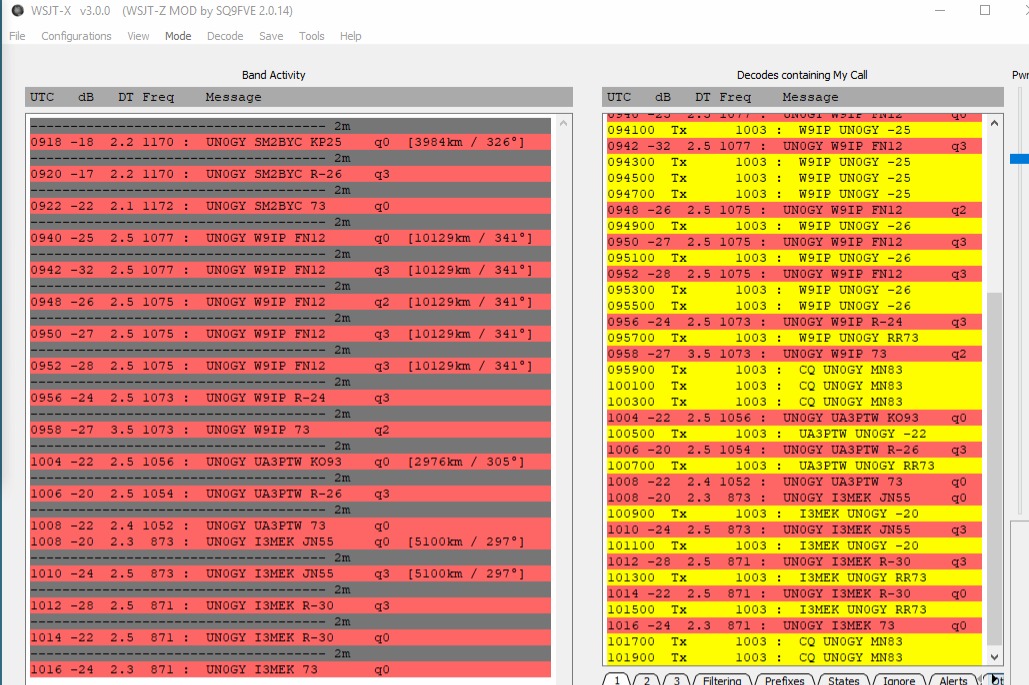
I was a true fun and thril today to see how the stations come from the abyss to decode simply because the Moon is moving and appearing to the lobes of the antenna due to reflection from the ground …
Thanks for everyone for that!
2026.Jul.09
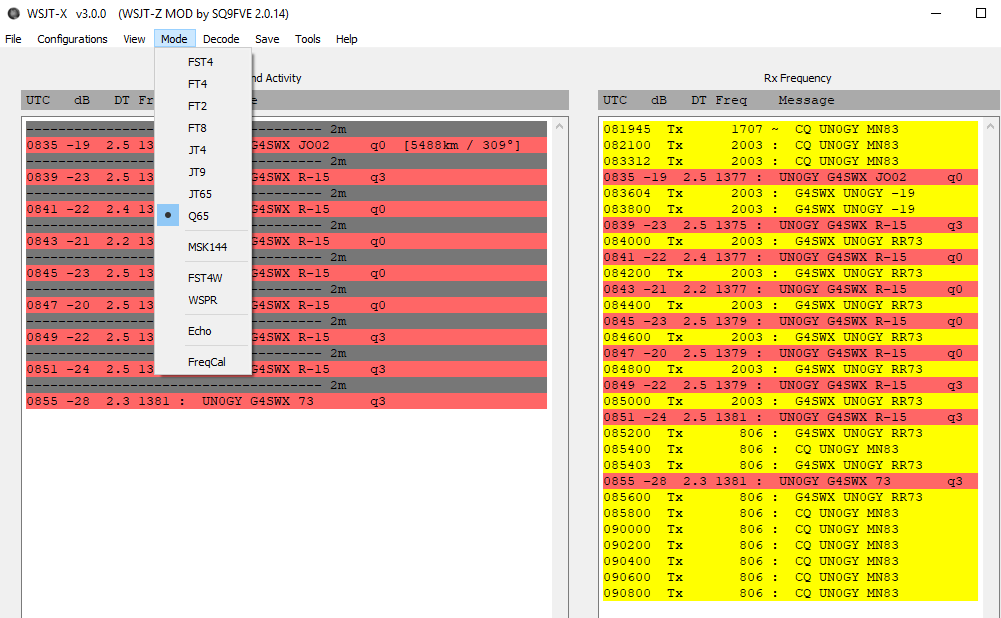
My first ever EME QSO!
- Thank you very-very-very much, John, G4SWX!
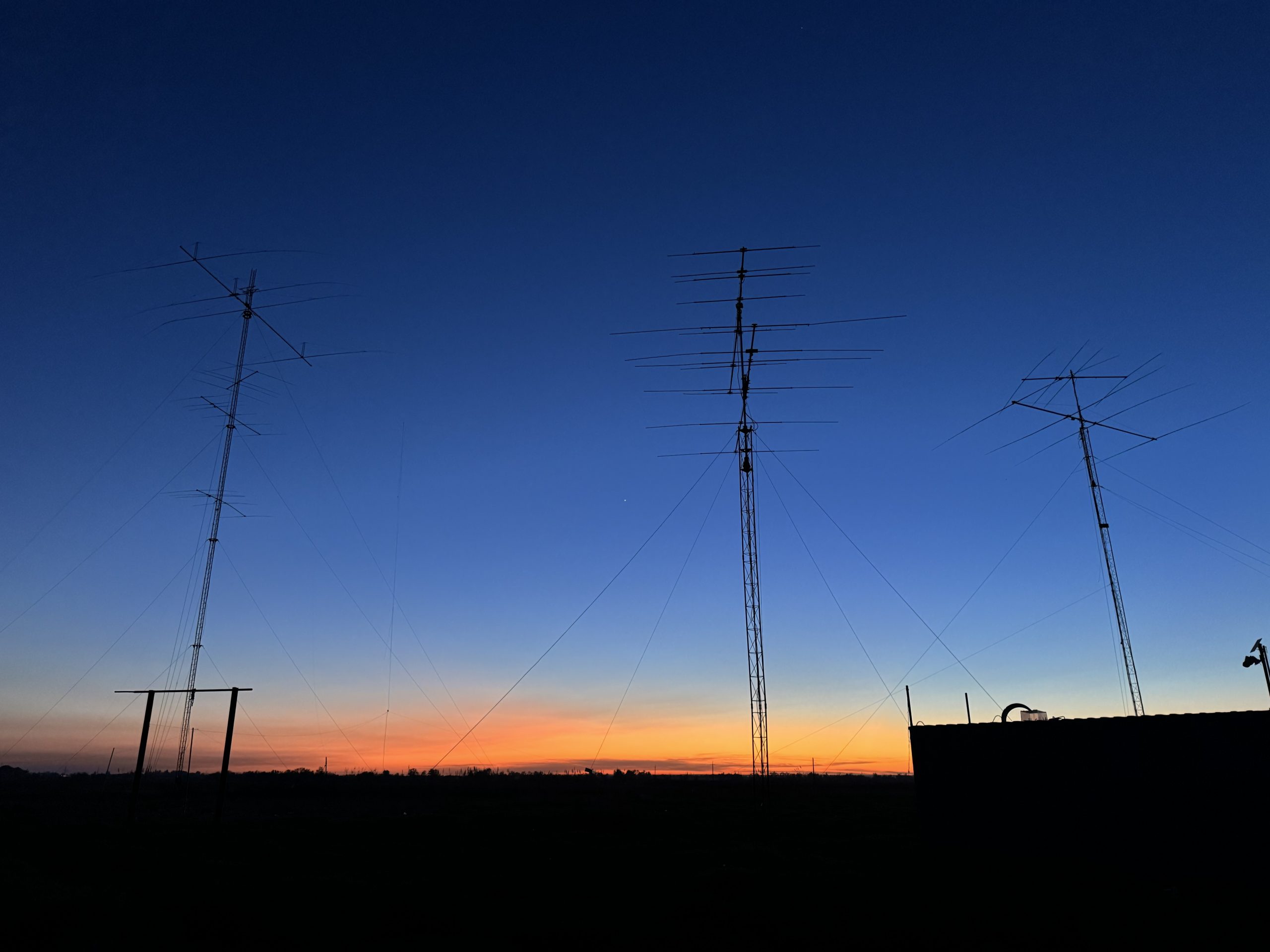
… And then I suddenly realized that my 6m and 2m antennas are on different transceivers, but their antennas are very close – just 2 meters apart from each other – and transceivers can kill each others’ LNAs …
I stared worrying about it very much and even planned to have a switch, which difficult and takes time to create because I operate remotely and introduces extra-losses, etc… but before doing all that, I measured S21 between the antennas on the TRXs sides …
S21 between 2m and 6m antennas on 50.313 MHz

S21 between 2m and 6m antennas on 144.125 MHz

So, the isolation was surprisingly high on 50.313 MHz and a bit risky but still on the manageable side on 144.125 MHz.
Thus, I decided not to over-complicate and have both transceivers connected to their respective antennas even when another one is emitting 100W.
Intro
I had been away from the radio for 25 years. But the last thing I eyed before jumping into the corporate world was EME. In the late 90s, there was no proliferation of modern digital modes. Thus, reaching the Moon and back was beyond the capabilities of most humans. But not completely impossible. And that was luring a lot, though I had virtually zero practical opportunity to implement the dream into reality.
It is time to catch up 🙂
2026.Apr.25
Planning the Moon meetup using the Moon Tracker app. Since the 6m 7-ele OWA Yagi is a weak antenna for EME, the plan was to use the ground reflection and to have up to 6 dB gain, which is a lot. Effectively, it is like four the same antennas ideally combined and facing the Moon up.
It is a lot of free gain. But, of course, the guys on the end of the EME connection must have either the same low-angled Moon, which is a low-probability event, or a properly rotatable antenna with the elevation as well.
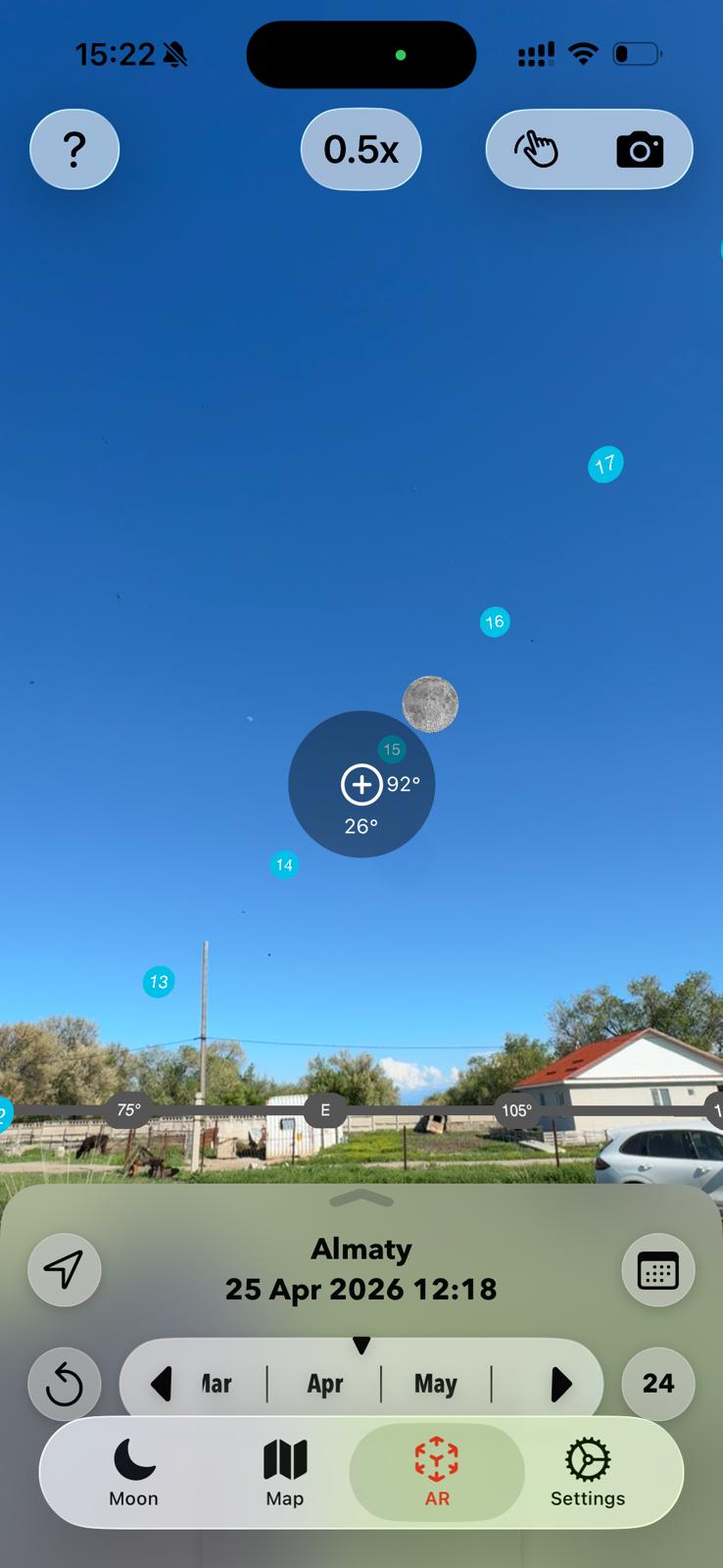
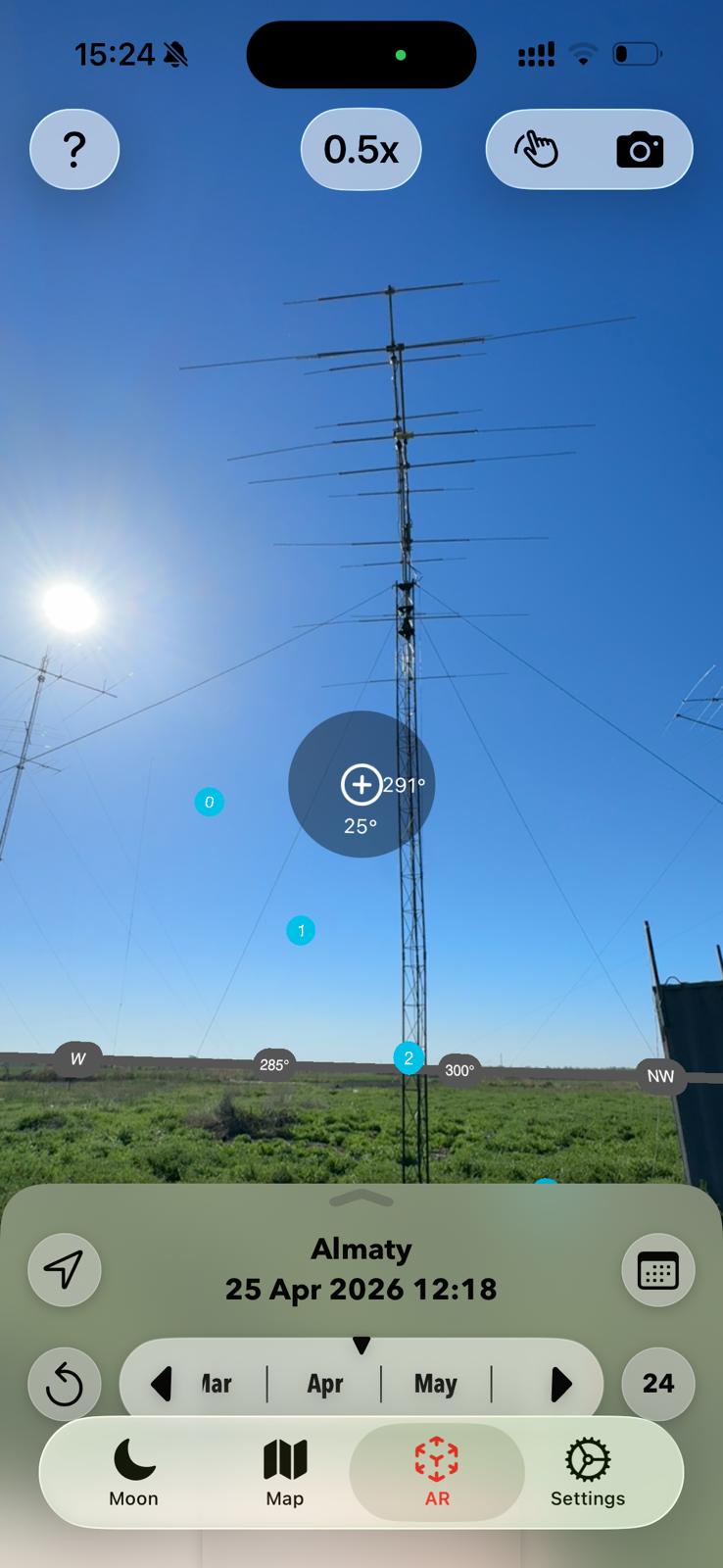

Since I didn’t even have a 2m or 70cm transceiver, but I couldn’t wait anymore, the 6m 7-ele OWA Yagi could be an opportunistic option and lovely Icom 7300 as the main engine, if not making a QSO but receiving somebody over the Moon.
When I started, I didn’t have an LNA, but I quickly assembled one as a part of future remote Antenna Switch + LNA + Sequencer + IMU for antenna positioning.
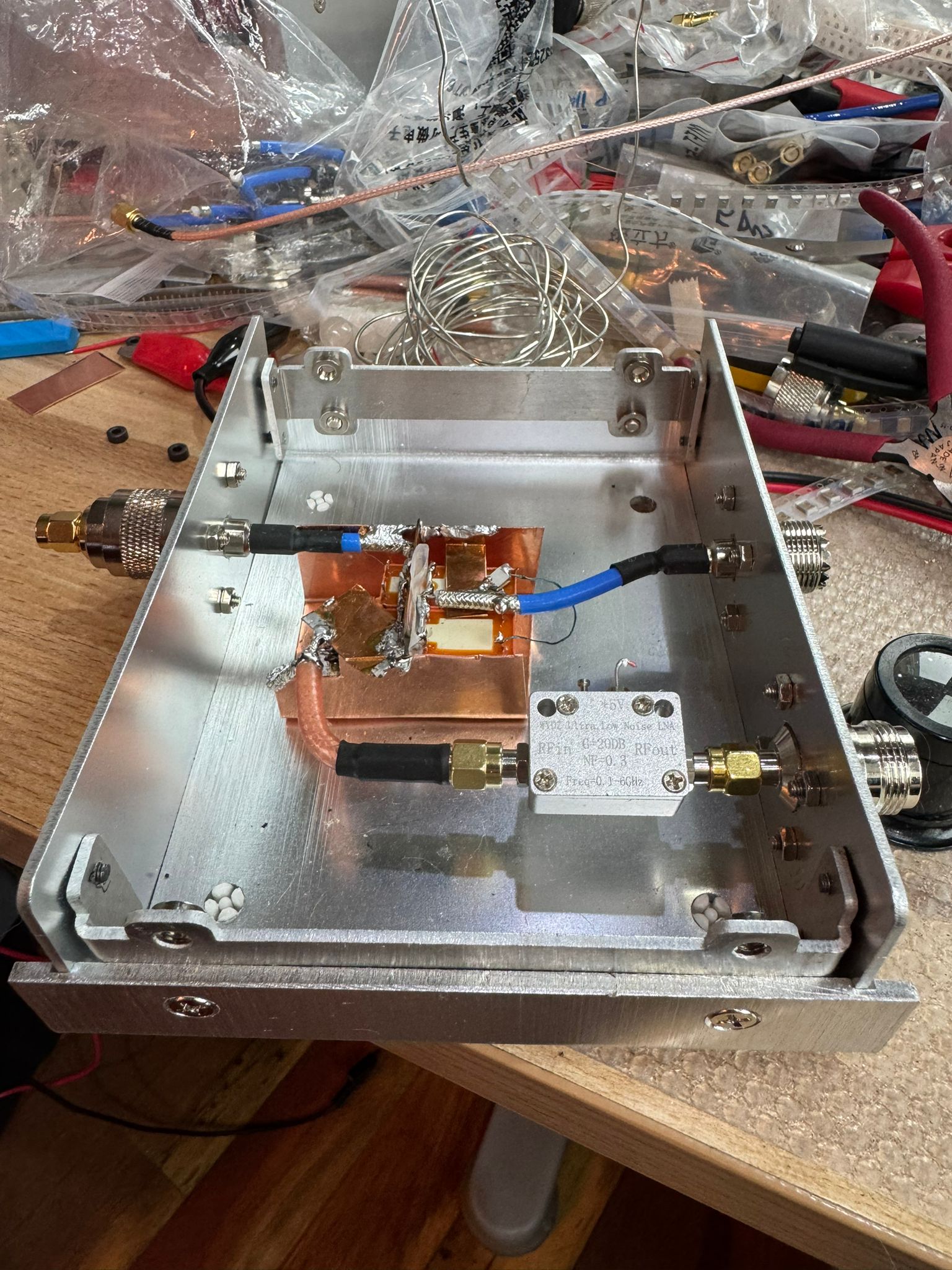
Yes, I purchased a few reputable transistors to make the LNA as well, but I purchased a couple of ready-to-use (and very inexpensive but with unconfirmed NF or P-1 compression points LNAs on Alibaba). It was aimed at saving time. It worked out well 🙂
The same housing was expected including the antenna switch that consisted of two relays – to provide the maximum TX/RX isolation because sooner or later I planned to hit it with 500-1000 W of 6m power. The PA was broken by that time, though. So, on the RX exercise was on my mind.
The basic antenna switch approach was inspired by this link. These guys are great overall and I grabbed quit a few ideas from them, including the approach the 40m 4-ele OWA Yagi.
S57RR - you are forever in my heart 🙂
Bert’s antenna:

Pay attention to other key Q65a settings below:
- Submode
- RX frequency
- Max drift
- Ftol
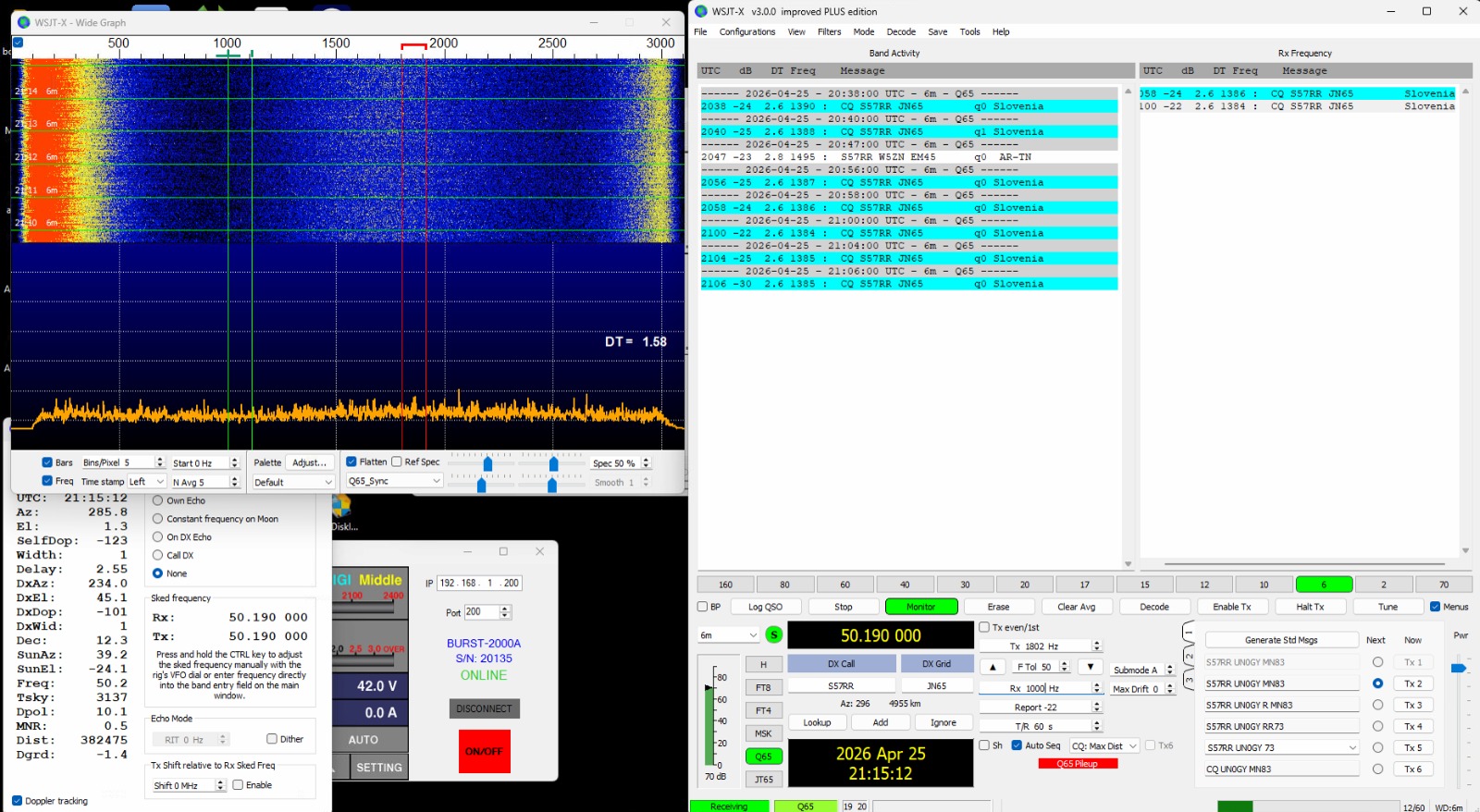
As one can see, I had decoded Bert’s signal for about 1/2 hour. So, the Moon was from 8-10 deg to 3-5 deg during this time. My 6m OWA 7-ele Yagi is 12m – i.e., 2λ above the ground. It defines the highest expected angle of the main beam.
Funnily, I monitored the Moon from my window in Almaty apartment on the 12th floor, though the real action – where my QTH is located – was about 50 km from me – on the farm. It was a remote operation.

Key starting links
- https://www.on4kst.org/chat/index.php – the chat to arrange the QSO (or its attempt) and valuable advice about WSJT settings, which and many, to ask
- https://www.bigskyspaces.com/w7gj/Q65SETUP.pdf – Q65 setup. But I was helped in the chat above
- https://wsjt.sourceforge.io/Q65_Quick_Start.pdf – another master guiding document

WSJT settings that worked for me
I acted as a monkey and set what I was told to set based on the advice from helping hams from the chat:
- Q65 pileup – no idea why it is required
- Most sensitive

I set Decode after EME delay – as I was asked.
